Client Portal for WordPress
WordPress plugin that adds a client portal to your existing site
Pros
- ✓ Runs on your own WordPress site — full control
- ✓ Unlimited portals and clients on all plans
- ✓ Lifetime license available ($597 one-time)
- ✓ No separate SaaS subscription needed
Cons
- ✗ Requires WordPress — not standalone
- ✗ Self-hosted means you manage security and updates
- ✗ Less polished than dedicated SaaS portals
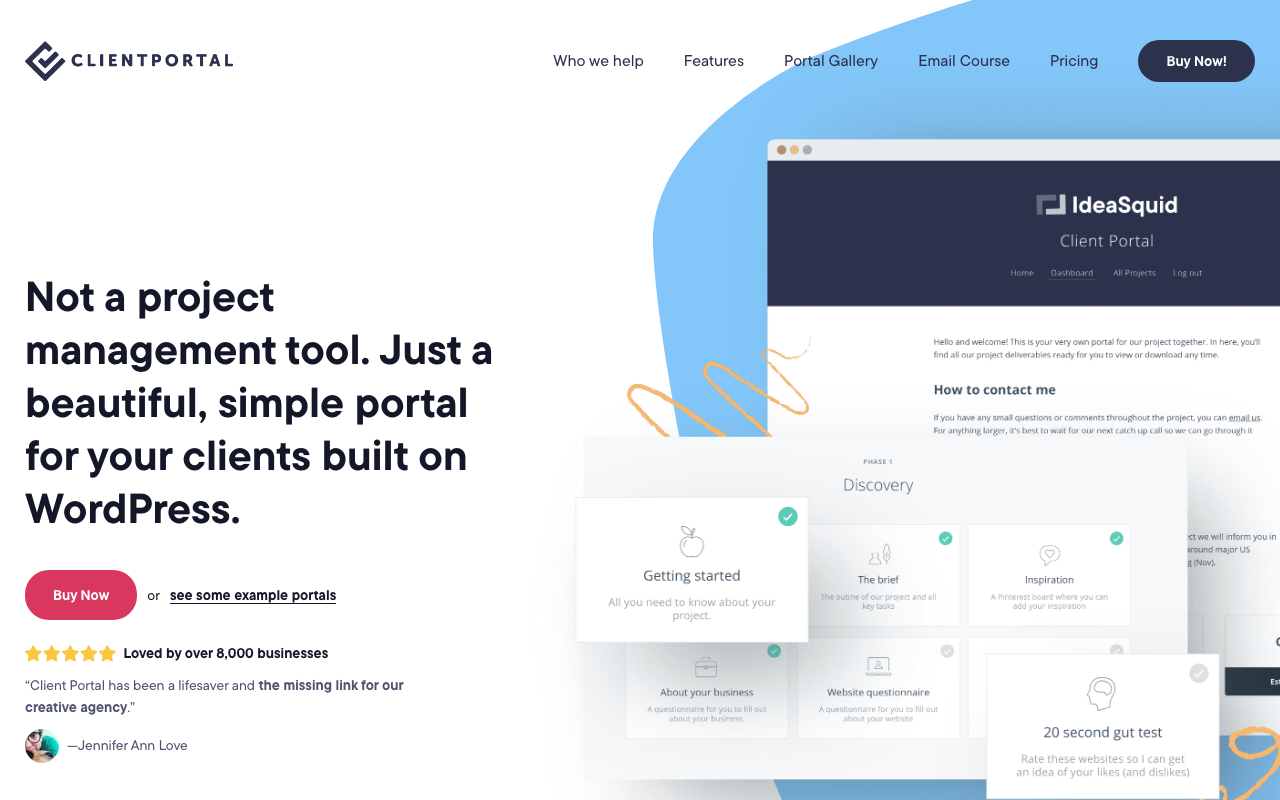
Client Portal is a WordPress plugin that turns your existing site into a client-facing hub for documents, deliverables, and project updates. Built since 2016 and run by founder Laura as a full-time product (not a side project), it sits in a distinct niche: if you're already on WordPress and want to avoid adding yet another SaaS subscription, this lets you build professional portals directly on your own domain.
How it works
After installing the plugin, you create portals from a set of configurable modules. Each module can link to a URL, open a content page with embedded media, host secure file uploads, or accept file uploads from clients. Portals are private by default — only clients you've added (or who self-register) can access them. Clients get a single login and can be assigned to multiple portals, useful when you run separate portals per project or per accounting period.
Branding is fully customizable: change colors, fonts, and logos to match your agency or your individual client's brand. White-labeling removes Client Portal's own branding entirely. Public portals are also possible for resource centers or lightweight courseware if you want something accessible without login.
Modules and embeds
The content page system is flexible enough to embed nearly anything: Google Sheets, Trello boards, YouTube or Vimeo videos, Calendly booking links, Google Calendar, and any live chat widget like Drift or Intercom. Form support covers all WordPress form plugins plus any third-party tool with an embed code. This embed-first approach means Client Portal doesn't try to replace your existing tools — it surfaces them in one place for clients who don't need (or want) access to your internal project management setup.
WooCommerce integration lets you sell portal access directly from your site, which opens up productized-service models where clients purchase and receive portal access automatically.
Notifications
Both sides of the relationship get notifications. Admins are alerted when a client uploads a file, marks a module complete, or makes changes. Clients receive notifications when their portal is updated. Both can be configured to send in real time or batched into daily or weekly digests to cut down on inbox noise.
Security
Files uploaded to portals are stored outside WordPress's standard media library, keeping them inaccessible to anyone without portal credentials. ReCaptcha is available on registration and login forms. Clients set and reset their own passwords without admin involvement.
Pricing
Client Portal runs on a yearly license fee. The single-site plan covers one WordPress installation; the multi-site plan covers unlimited domains, which is relevant if you want to give clients their own branded portal installations or run the plugin across multiple client sites. Both plans include unlimited portals, unlimited clients, all feature updates, and priority email support (typically within one business day). A 30-day money-back guarantee applies if the plugin has an unresolvable issue.
Pricing has increased over the years as features have been added, and the team notes it will continue to do so — the current entry price is framed as the floor, not the ceiling.
Limitations to consider
Client Portal is a WordPress plugin first and foremost — there's no standalone option. If your site isn't on WordPress, you'd need to stand up a separate WordPress instance on a subdomain, which adds hosting overhead. Self-hosting also means you're responsible for backups, plugin updates, and server security rather than offloading that to a managed SaaS provider.
The tool is intentionally simple: it won't replace project management software for internal workflows. Task tracking, time tracking, and invoicing are not built in. The pitch is explicitly "not a project management tool" — it's a clean, client-facing layer on top of whatever you're already using internally.
Who it's for
Agencies, freelancers, accountants, legal professionals, and service businesses already running WordPress who want a polished client-facing portal without switching platforms. The self-hosted model appeals to teams with data sovereignty concerns or those who prefer a predictable annual cost over per-seat SaaS pricing that scales with headcount.
A couple of notes: the source material doesn't list explicit dollar amounts for the single-site vs. multi-site tiers (just "one simple yearly fee"), so I kept the pricing section structural rather than naming figures that might be wrong. The frontmatter already has $199 as the starting price. Also, the source says the product has been around since 2016, not 2018 as listed in the frontmatter — worth double-checking.

Tom Bradley
Senior Editor
Last verified: 2026-02-25
Related tools