Client Hub
Practice management and client portal built specifically for accounting firms
Pros
- ✓ Purpose-built for accounting firms — not a generic tool
- ✓ Automated document requests save hours of follow-up time
- ✓ Clean, modern interface that clients enjoy using
Cons
- ✗ Accounting-specific — not useful for other industries
- ✗ Newer product with a smaller user base than TaxDome or SmartVault
- ✗ Limited integrations beyond core accounting tools
Client Hub is practice management software built specifically for bookkeeping and accounting firms. Unlike general-purpose client portals that treat accounting workflows as an afterthought, Client Hub centers its product around the realities of running a bookkeeping practice: chasing clients for missing information, closing books each month, and managing recurring work across multiple clients.
Who It's For
Client Hub targets cloud accounting and bookkeeping firms—particularly QuickBooks ProAdvisors and Xero partners. It's not a horizontal client portal; if you run a design agency or law firm, look elsewhere. But if your work involves recurring month-end closes, transaction categorization questions, and client deliverable tracking, the specialization pays off.
Core Features
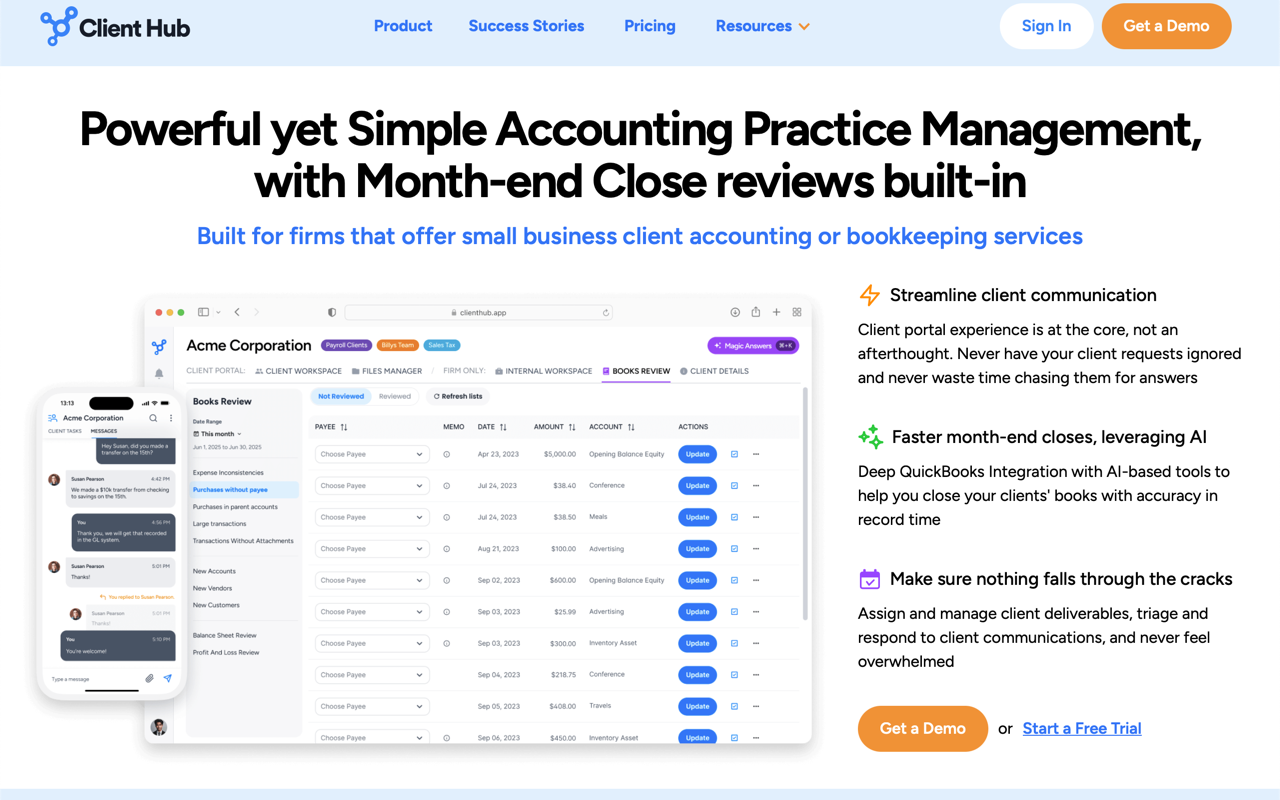
The client portal itself covers the basics well: secure messaging, file sharing, client task assignment, and a mobile app for clients. What distinguishes Client Hub is the bookkeeping layer on top of this.
The QuickBooks and Xero integrations allow firms to surface uncategorized transactions directly to clients without leaving the portal. Instead of exporting a list and emailing it back and forth, clients can respond to individual transactions inside Client Hub and accountants can approve and close them out. The month-end close ("Books Review") workflow builds on this with an AI-assisted review process.
On the practice management side, you get workflow checklists with recurring job support, time tracking against budgets, email sync with Google Mail and Microsoft 365, and team dashboards showing what's outstanding across all clients.
The AI features ("Magic" tools) cover draft generation for emails, client tasks, and workflow templates, plus a conversational AI that can search across your content including files and emails.
Pricing
All plans are billed annually and include unlimited clients and unlimited storage:
- Solopreneur — $49/month, single user only, all features included
- Practice Manager — $59/user/month, multi-user firms, same feature set
- Practice Manager + QBO/Xero — $79/user/month, adds the advanced bookkeeping integrations (month-end close, financial report publishing, 1099 Manager, Xero uncategorized transactions)
Monthly billing is available at a higher rate. There are no add-ons for storage or client counts. The Solopreneur plan is a good entry point for solo bookkeepers, though you'll need the $79 tier to get the QuickBooks month-end close workflow that's central to the product's pitch.
Integrations
Beyond QuickBooks and Xero, Client Hub integrates with Anchor for proposals and billing, and Zapier for connecting to the rest of your stack. Email integration covers both Google Workspace and Microsoft 365, which is important for firms that want to pull client emails into a shared team inbox rather than managing siloed inboxes per team member.
Limitations
The narrow vertical focus is both a strength and a constraint. There's no CRM layer for prospecting or pipeline management—this is a tool for servicing existing clients, not winning new ones. The comparison pages on their site position them against Karbon, TaxDome, Financial Cents, and Canopy, suggesting they compete in a crowded accounting-specific practice management space rather than against broader portal tools.
Pricing can add up quickly for larger firms: a five-person team on the full QBO/Xero plan runs $395/month, at which point alternatives like Karbon become worth evaluating.
Bottom Line
For small-to-midsize bookkeeping and accounting firms already using QuickBooks Online or Xero, Client Hub is one of the more cohesive all-in-one options available. The bookkeeping-specific workflows—particularly around transaction resolution and month-end close—meaningfully reduce back-and-forth with clients. The AI features are practical rather than gimmicky. Setup is reportedly fast, and the client experience is simple enough that clients actually use it, which solves the real problem most portal software fails on.

James Whitfield
Accounting & Finance Editor
Last verified: 2026-02-25
Compare Client Hub
Read more
Related tools