Bitrix24
All-in-one collaboration platform with CRM, project management, and client portals
Pros
- ✓ Genuinely all-in-one — CRM, project management, HR, website builder, and portal under one roof
- ✓ Generous free tier with unlimited users (storage-capped) and core features included
- ✓ Self-hosted option gives regulated industries full data control without third-party SaaS dependency
- ✓ CoPilot AI is integrated across tasks, chat, and content creation rather than bolted on
- ✓ Workgroups let you invite external clients with granular access permissions
Cons
- ✗ Feature breadth creates a steep learning curve — teams often use a fraction of what's available
- ✗ Interface feels cluttered; navigation across modules is not intuitive for new users
- ✗ Client portal experience is functional but lacks the polish of dedicated portal tools
- ✗ Paid plans jump significantly in price — the free tier can feel like a ceiling before long
- ✗ Mobile app quality lags behind the desktop experience for complex project work
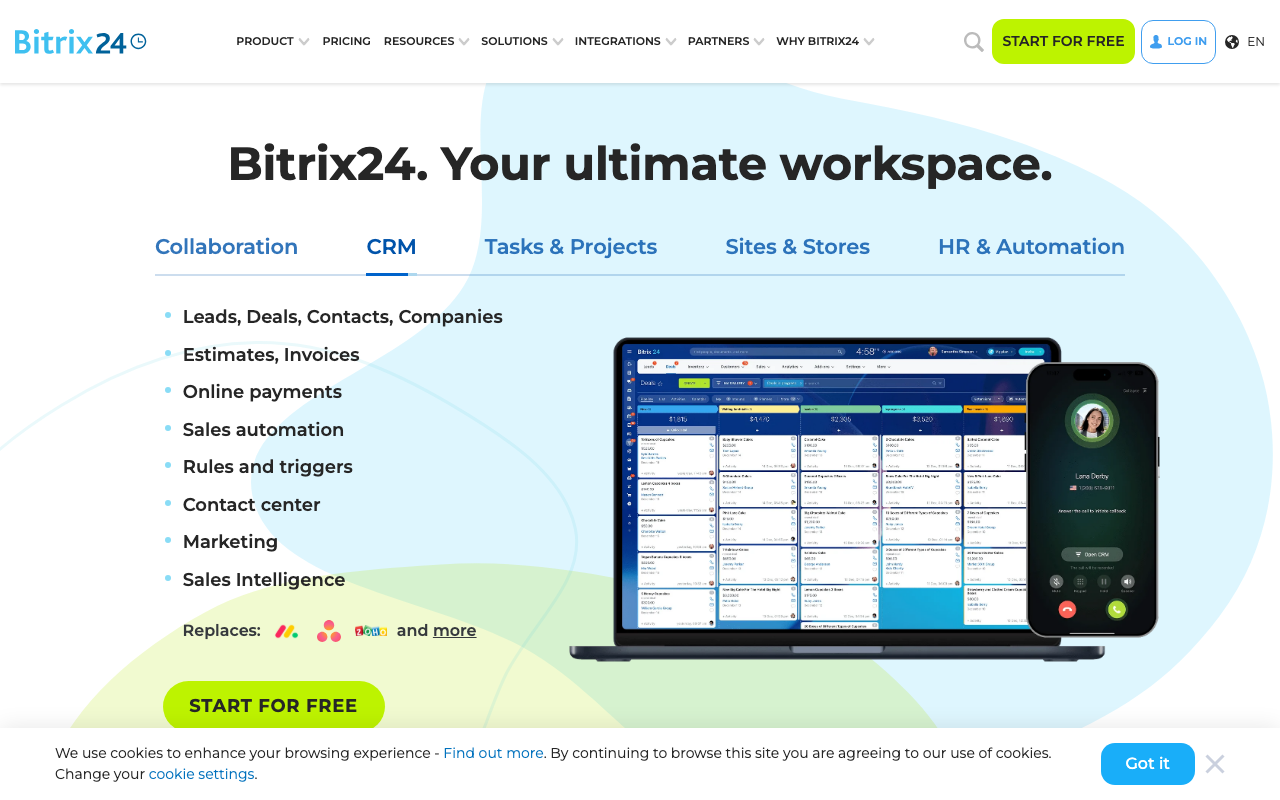
Bitrix24 is best understood as a business operating system rather than a client portal tool. It packages CRM, project management, team communication, HR, website building, and e-commerce into a single platform — which is both its biggest selling point and its most common source of frustration.
What "client portal" means in Bitrix24
The portal functionality in Bitrix24 is built around workgroups: shared spaces where you can invite external users, assign tasks, share files, and communicate. Clients get their own scoped view with configurable permissions. It's capable, but it's not a polished, white-labeled portal experience — clients land in the same interface as your team, just with limited access. If your clients expect a clean, purpose-built portal, Bitrix24 will feel rough around the edges.
Project and task management depth
Where Bitrix24 genuinely earns its stripes is project management. You get Kanban boards, Gantt charts, Scrum support, and a traditional task list — switchable per project. Sub-tasks, checklists, time tracking, focus mode, and supervisor mode are all included. Workload management and KPI reporting help team leads track efficiency without needing a separate tool. For agencies or IT teams running multiple concurrent client projects, this depth is hard to match at the price point.
Collaboration suite
The platform includes a full internal social network: activity feed, reactions, video announcements, and company-wide chat. Video calls support screen sharing, call recording, and custom backgrounds. Shared calendars handle personal and company-wide scheduling, with meeting room booking and sync to external calendar services. These aren't afterthoughts — the collaboration tools have been core to the product since launch.
CoPilot AI
Bitrix24's CoPilot is woven into multiple modules: it generates task descriptions and summaries, writes checklist items from a brief, assists in chat with brainstorming, and produces AI-generated copy and images in the website builder. It's included at no extra charge across plans, though advanced usage is typically gated to higher tiers.
Website builder and e-commerce
The built-in CMS lets you build sites with hosted templates, AI-generated images and text, lead capture forms, and a full online store with inventory management, order processing, and payment integrations. It also supports social selling via Facebook, Instagram, WhatsApp, and Telegram. This makes Bitrix24 unusually complete for small businesses that want to avoid stitching together multiple tools.
Pricing
The free plan is genuinely usable — unlimited users, core CRM, tasks, and workgroups, with a 5 GB storage cap. Paid plans start at $61/month for the Basic tier (5 users), scaling to Standard at $124/month (50 users) and Professional at $249/month (100 users). An Enterprise tier covers larger teams. Annual billing reduces these prices. The self-hosted edition (Bitrix24.OnPremise) is licensed separately at a much higher one-time cost, aimed at enterprises with strict data residency requirements.
Who it's for
Bitrix24 makes the most sense for small to mid-sized teams that need CRM, project management, and basic client collaboration in one place and don't want to pay for five separate tools. It's particularly well-suited for agencies and IT service providers managing multiple client relationships simultaneously. Teams that need a refined, purpose-built client portal — with custom branding, structured onboarding flows, or document approval workflows — will likely outgrow the portal capabilities quickly and should evaluate dedicated tools alongside it.

David Park
Enterprise & Compliance Editor
Last verified: 2026-02-25
Compare Bitrix24
Related tools